Work Life Balance and Time Management

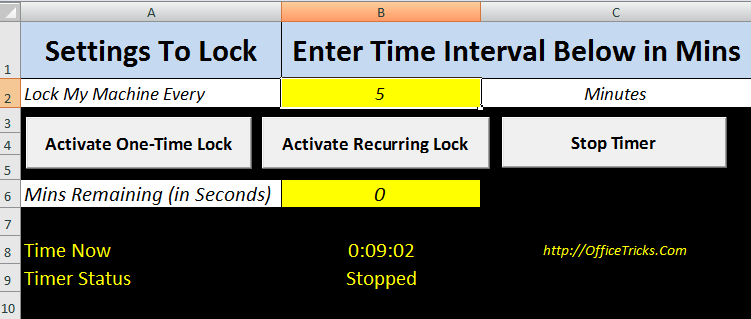
This article explains how to Automate Locking a Windows Workstation and schedule your Tea breaks between hectic work, through Excel VBA Macro. Also, you can find a Excel App Download available at end of this page to schedule time and lock the system.
Excel simplifies our work to a greater extend, that people are getting more and more used to it. I have seen people using Excel even to get results for simple mathematical calculations. It might even completely replace the traditional Calculator available with Windows, some day in future.
“All Work and No Play makes Jack a Dull Boy“
Click Here Download Excel Application To Schedule and Lock Computer – Downloaded 1,982 times
Easy to Implement New Ideas
Excel, combined with VBA, is a Simple and Powerful Application. Not only simple calculations, it can even take control over the system to a great extend.
In this page, we will see how we can Lock or Shutdown a computer from an Excel. But, why do we need to learn such option.
Let’s plug in this option for some good purpose. These days’ people spend lot of time with eyes stuck on the monitor and with mind roaming in virtual world. Let’s use this option to give them a break. With the code explained below, user can set a time limit (i.e., 1 Hr or 1 ½ Hrs) and give commands to the system to lock at this predefined time interval.
Read: How to simplify Appointment updates to Outlook Calendar with Excel?
How to Lock Windows System with Excel VBA?
To develop this App, we need two Modules:
- Module1: To Lock the workstation
Open a command prompt and execute this command “rundll32.exe user32.dll, LockWorkStation” or we can use the LockWorkStation Windows API Function. This will lock the workstation. We are going to invoke this command from VBA.
Private Declare Function LockWorkStation Lib "user32.dll" () As Long

Sub Lock_Computer_Method_1()

    '''''Call API to Lock Workstation. This Function does not have any Parameters
    LockWorkStation

End Sub

Sub Lock_Computer_Method_2()

    ''''Create Object for executing rundll32 exe. Create an object for WScript.
    Set WshShell = CreateObject("WScript.Shell")

    ''''Now pass the parameter to lock the workstation to rundll32 exe
    WshShell.Run "rundll32.exe user32.dll,LockWorkStation"

End Sub
- Module2: A Timer to call module1 on a scheduled interval
We have to write the above code in VB editor and then press F5 to check whether the computer is getting locked or not. Once that is done, we need to add a timer to the Excel that will invoke module1 at a scheduled timer interval, so that user can go for a short break between hectic work.
Read: Read this Article to know how to execute a code at scheduled interval
Download Excel App
Note: Please read the limitation of this tool before using it.
Click Here Download Excel Application To Schedule and Lock Computer – Downloaded 1,982 times
Limitation
When this app is Open and Active, we cannot work in any other excel documents, since it has a active Timer that ticks every second.
But, this is only a limitation of this code given here. You can design your own app by using the above code snippets and develop app of your own. And if you still need further help, please leave a comment and we would be happy to help.
One Step Ahead: How to Log off or Shutdown a Computer with Excel?
Updated the Excel App to stop the count down when the computer is in lock status.
Added code to check whether the computer is in lock or unlock status every second and stop counter if system is in lock status.
Nice…
post more and more ideas to use the Excell effectively,
thanks.