How To Save All Photos From Facebook To Computer?
Download Facebook Photo Album is right in albums page itself. Just in front of our eyes, yet we miss to notice it.
Still if you are not so sure, then here it is.
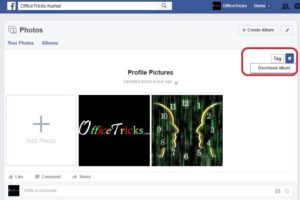
- Open Facebook Profile.
- Click on Photos.
- Open any Album from list.
- Click on Settings icon inside album.
- Click ‘Download Album’ option.
- Select Continue & Wait.
- Download Zip file it is ready.
Facebook will notify you when the Album is ready to be downloaded in Zip format. This Zip will have all the photos in the album.
If your album has too many photos, then it takes lot of time to get it ready & also to download.
Download Pictures From Facebook Photo Album
If it is your own pictures, then there is no problem. You will have options right on the image that you are viewing.
But if it is a picture from another one’s profile. Then the other person should have enabled the below option. Else, there are other ways which you can do if you are good in HTML. But here, I am just going to explain only legitimate methods.
- Open Facebook Profile.
- Click on any image from Album.
- Move cursor on Image.
- Select ‘Options’ from Menu at bottom of image.
- Click on ‘Download’.
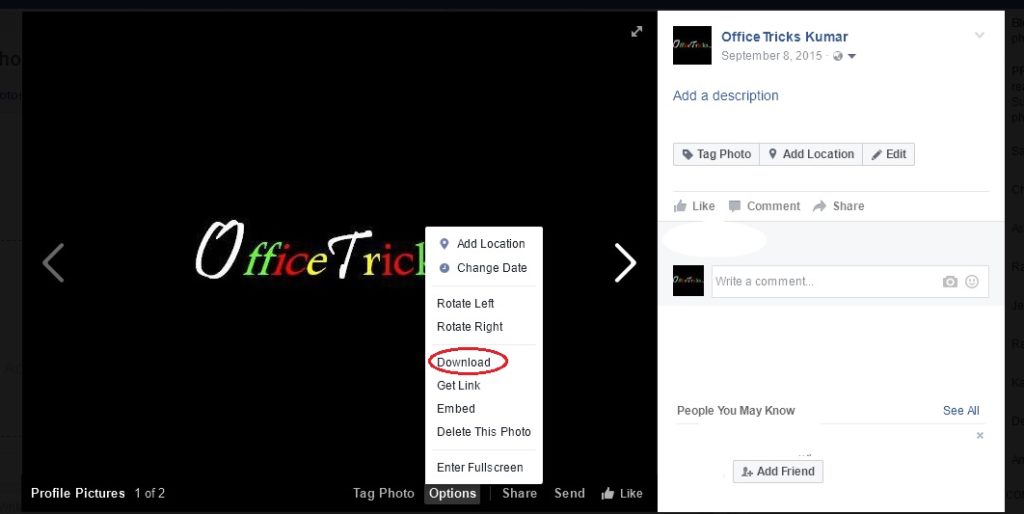
A file download menu will open up. Enter the location for the file to be saved. Click ok. This will start the file download.
Once completed, open the file location & verify that the file is downloaded properly.
Alternate Option to Save Facebook Picture
What if the options is not enabled. Right click on the picture. Select View image. Then, again right click, choose Save as option.
This option is not something that is provided by Facebook. This is a builtin option available in your internet browser. Any image shown on a internet browser is downloadable.
Even if the browser does not provide an option for that, the computer geeks keep on finding a work around to steal the pictures. So, the conclusion is: if you want to keep your photos to be absolutely private, then don’t bring to any online space.
